Deplacer
🗂️  Free & Open Source · Windows 10/11

Stop living in
a messy folder.

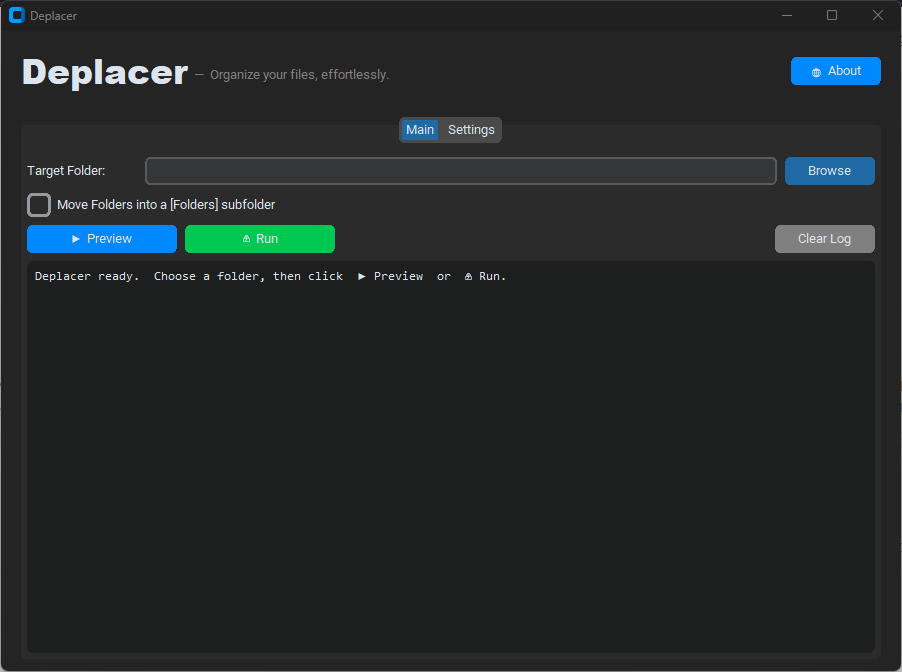
Deplacer automatically sorts any folder into clean, categorized subfolders — in one click, with a live preview before anything moves.
⬇  Download Free ▶  See How It Works
Deplacer application screenshot

Everything you need to stay organized

Deplacer handles the tedious work so you don't have to.

🔍

Live Preview

See a full list of every planned move before a single file is touched. No surprises.

One-Click Sort

Hit Run and Deplacer instantly moves every file into its correct subfolder.

🎛️

Fully Customizable

Add, rename, reorder, or disable any category. Assign any file extensions you like.

🏷️

Configurable Prefix

Output folders are prefixed with Sifter- by default, keeping them visually grouped — or remove it entirely.

🛡️

Conflict-Safe

Duplicate filenames are never overwritten. Conflicts are renamed to file_1.ext, file_2.ext, and so on.

💾

Persistent Settings

Your categories and preferences are saved automatically and restored on every launch.

Sorted in three simple steps

No setup required. Open Deplacer, pick a folder, and you're done.

1

Choose a Folder

Click Browse and select any folder on your PC — your Desktop, Downloads, or anywhere else.

2

Preview the Plan

Click ▶ Preview to see a detailed log of exactly where every file will go — without moving anything yet.

3

Run the Sort

Click ⚡ Run and Deplacer moves every file into its categorized subfolder in seconds.

15 built-in categories, fully editable

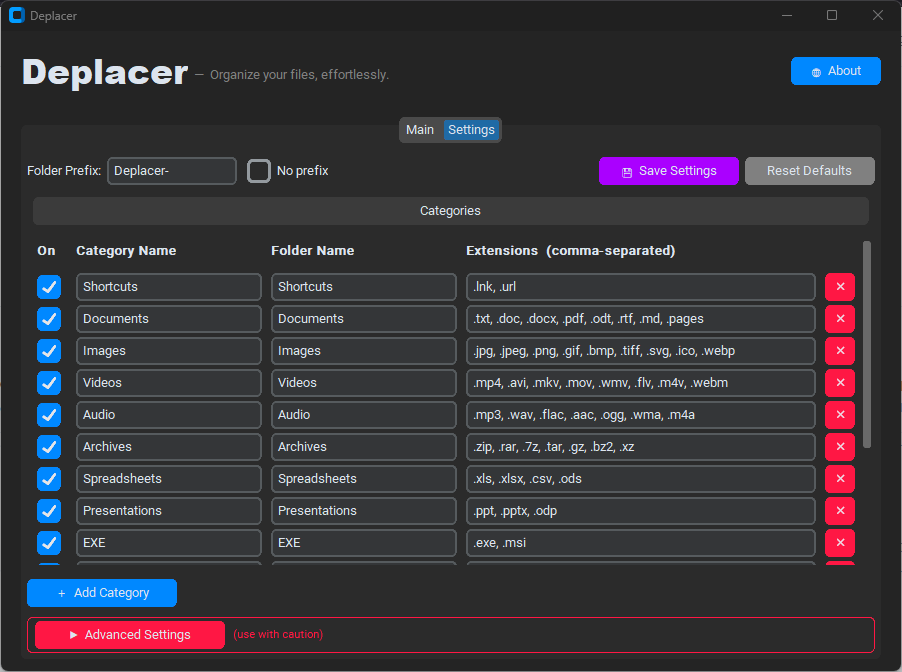
Every category ships ready to use. Add new ones or tweak the extensions in the Settings tab.

🔗 Shortcuts .lnk  .url
📄 Documents .pdf .doc .docx .txt .md …
🖼️ Images .jpg .png .gif .webp .svg …
🎬 Videos .mp4 .mkv .avi .mov .webm …
🎵 Audio .mp3 .wav .flac .aac .ogg …
📦 Archives .zip .rar .7z .tar .gz …
📊 Spreadsheets .xlsx .csv .xls .ods
📽️ Presentations .pptx .ppt .odp
⚙️ EXE .exe  .msi
💻 Code .py .js .html .cs .go .sh …
🔤 Fonts .ttf .otf .woff .woff2
📚 E-books .epub .mobi .azw .fb2 .cbz …
💿 Disk Images .iso .img .dmg .vhd .vhdx
🧲 Torrents .torrent
�🗃️ Other Catch-all for everything else

Fine-tune every detail

The Settings tab puts you in full control — no config files to edit by hand.

Deplacer Settings tab screenshot

🎛️ General Options

  • Folder Prefix — prepend a custom label to all destination folders (default: Sifter-)
  • No Prefix — check the box to sort into plain folder names with no prefix
  • Move Folders — move subdirectories into a dedicated Folders subfolder
  • Add Category — create a brand-new category with a custom name and extension list
  • Reset Defaults — restore all categories and settings to factory defaults

⚠️ Advanced: Recursive Mode

  • ! When enabled, Deplacer descends into every subfolder and sorts files found there too.
  • ! This is a destructive, hard-to-reverse operation on large directory trees.
  • ! Always run a Preview first when using recursive mode.
  • ! Hidden behind an expandable panel — must be deliberately unlocked.
Get Deplacer

Free to download & use

Grab the standalone executable — no Python required — or run directly from source.

🖥️

Windows Executable

Self-contained .exe — just download and run. No installation needed.

⬇  Download .exe
🐍

Run from Source

Python 3.10+ with customtkinter. Clone and run in seconds.

View on GitHub

Requires Windows 10 / 11  ·  Python 3.10+ (source only)  ·  MIT License